One slider per brand
Switching a brand on starts its services and background programs and stops what is in the way; switching it off puts everything back to Manual and disabled.
Diagnostic workstation tooling
One-button switching between vehicle-brand diagnostic software on one PC.
Keep DiagBox, IDS, XENTRY, CLIP, ODIS, ISTA and the rest installed side by side and let the switcher decide what runs — no more suites fighting each other, no more manual clean-ups before a session.
Switching a brand on starts its services and background programs and stops what is in the way; switching it off puts everything back to Manual and disabled.
Some suites cannot coexist — DiagBox and Ford IDS, for one. The switcher knows which brands conflict and turns the other one off before it starts yours.
The PC keeps the state you left it in: a brand that is ON comes back by itself after a reboot, whether or not the switcher is running.
The stock state of every service and startup entry is recorded before the first change and restored by the uninstaller.
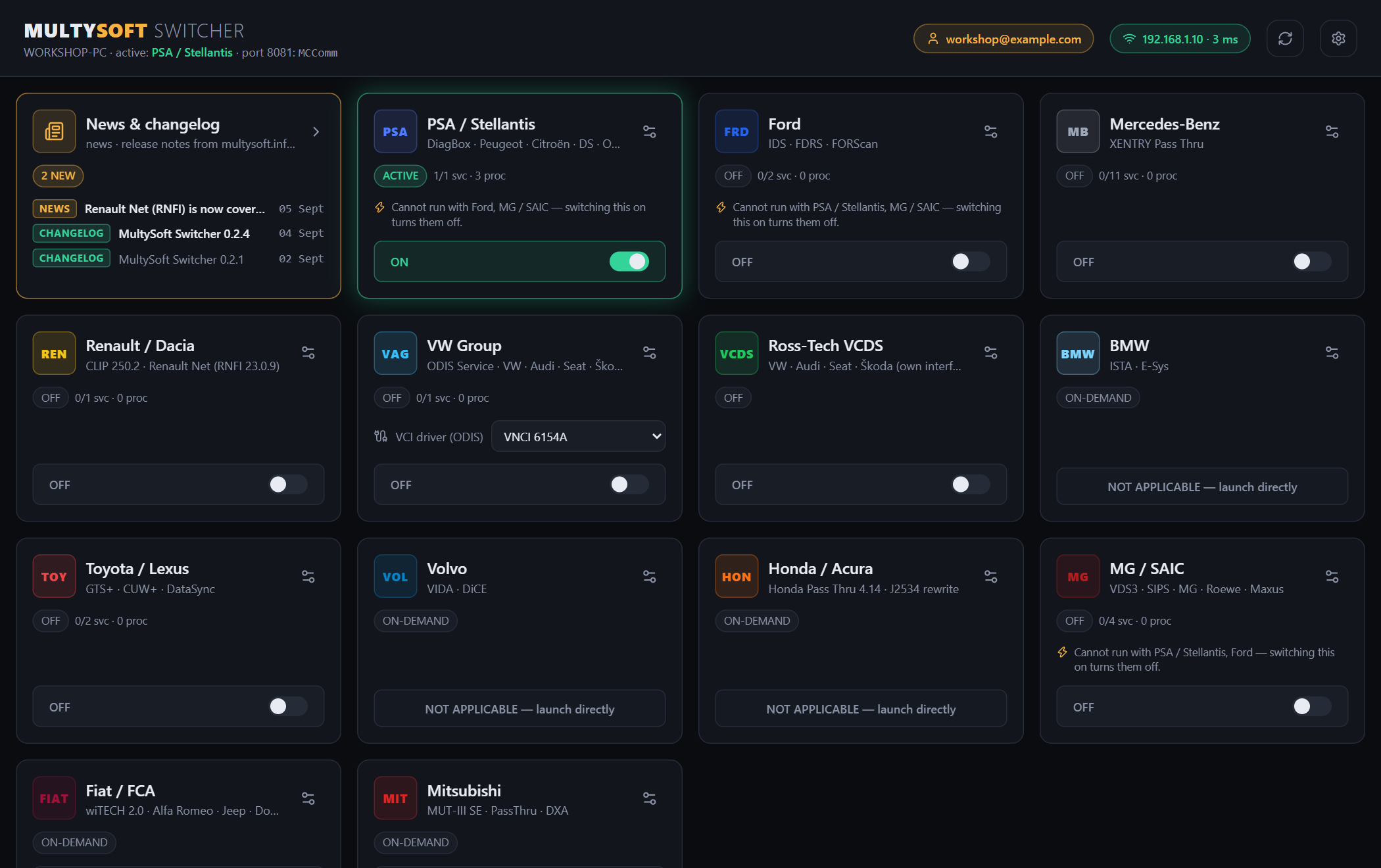
One tile per brand — the slider prepares that brand's environment. The first tile is the news & changelog feed from this site; the header shows your account, the link monitor and available updates.
Questions or an account request: support@infocore.uk
Current version 0.2.17. Only registered accounts can download — ask your administrator for one, or write to support@infocore.uk.
Download